<?xml version="1.0" encoding="utf-8"?><?xml-stylesheet type="text/xsl" href="atom.xsl"?>
<feed xmlns="http://www.w3.org/2005/Atom">
    <id>https://sellertoolsuserdocs.netlify.app/blog</id>
    <title>SellerToolsPlus Blog</title>
    <updated>2025-11-12T00:00:00.000Z</updated>
    <generator>https://github.com/jpmonette/feed</generator>
    <link rel="alternate" href="https://sellertoolsuserdocs.netlify.app/blog"/>
    <subtitle>SellerToolsPlus Blog</subtitle>
    <icon>https://sellertoolsuserdocs.netlify.app/img/favicon-32x32.png</icon>
    <entry>
        <title type="html"><![CDATA[Bulk Category management for BigCommerce made easy]]></title>
        <id>https://sellertoolsuserdocs.netlify.app/blog/bigcommerce-category-creation</id>
        <link href="https://sellertoolsuserdocs.netlify.app/blog/bigcommerce-category-creation"/>
        <updated>2025-11-12T00:00:00.000Z</updated>
        <summary type="html"><![CDATA[The curious case of Category Management in BigCommerce]]></summary>
        <content type="html"><![CDATA[<h2 class="anchor anchorWithStickyNavbar_LWe7" id="the-curious-case-of-category-management-in-bigcommerce">The curious case of Category Management in BigCommerce<a href="https://sellertoolsuserdocs.netlify.app/blog/bigcommerce-category-creation#the-curious-case-of-category-management-in-bigcommerce" class="hash-link" aria-label="Direct link to The curious case of Category Management in BigCommerce" title="Direct link to The curious case of Category Management in BigCommerce">​</a></h2>
<p>Anyone who worked with a BigCommerce catalog in the modern experience(v3) knows that BigCommerce takes only category ID while creating a product either using the CSV or API. As the category ID is a system generated id, one needs to create categories in advance and obtain their IDs beforehand and populate it in the CSVor API payload whenever you work on products in bulk.</p>
<p>We are working on BigCommerce stores of multiple types(Stencil storefront, headless, multichannel, multicurrency, multilingual BigCommerce stores) for the past 4+ years and we faced this difficulty every time we handled a complex catalog. Especially when you are migrating to BigCommerce from another platform, sometmes you come with a large set of SKUs mapped into a complex tree of categories with parent child branches.</p>
<p>By the time we were setting up our second store for an enterprise customer, we wrote an app to solve the category Management complexity. As our non technical team members will be managing the catalog post launch, we gave these apps a UI so that they can use CSV templates to manage categories in product catalogs. We are opening up access to this application for everyone as a SaaS(With a generous forever free tier to try the features). This article walks you through the usage of the tool.</p>
<h3 class="anchor anchorWithStickyNavbar_LWe7" id="our-solution">Our solution<a href="https://sellertoolsuserdocs.netlify.app/blog/bigcommerce-category-creation#our-solution" class="hash-link" aria-label="Direct link to Our solution" title="Direct link to Our solution">​</a></h3>
<p>Imagine you have categories like this</p>
<div class="language-text codeBlockContainer_Ckt0 theme-code-block" style="--prism-color:#393A34;--prism-background-color:#f6f8fa"><div class="codeBlockContent_QJqH"><pre tabindex="0" class="prism-code language-text codeBlock_bY9V thin-scrollbar" style="color:#393A34;background-color:#f6f8fa"><code class="codeBlockLines_e6Vv"><span class="token-line" style="color:#393A34"><span class="token plain">/electronics</span><br></span><span class="token-line" style="color:#393A34"><span class="token plain">/electronics/computers</span><br></span><span class="token-line" style="color:#393A34"><span class="token plain">/electronics/computers/laptops</span><br></span><span class="token-line" style="color:#393A34"><span class="token plain">/electronics/computers/laptops/14-inch</span><br></span><span class="token-line" style="color:#393A34"><span class="token plain">/electronics/computers/laptops/16-inch</span><br></span><span class="token-line" style="color:#393A34"><span class="token plain">/electronics/computers/desktops</span><br></span><span class="token-line" style="color:#393A34"><span class="token plain">/electronics/computers/accessories</span><br></span><span class="token-line" style="color:#393A34"><span class="token plain">/electronics/computers/accessories/mouse</span><br></span><span class="token-line" style="color:#393A34"><span class="token plain">/electronics/computers/accessories/keyboards</span><br></span><span class="token-line" style="color:#393A34"><span class="token plain" style="display:inline-block"></span><br></span><span class="token-line" style="color:#393A34"><span class="token plain">/electronics/home-appliances</span><br></span><span class="token-line" style="color:#393A34"><span class="token plain">/electronics/home-appliances/kitchen</span><br></span><span class="token-line" style="color:#393A34"><span class="token plain">/electronics/home-appliances/cleaning</span><br></span><span class="token-line" style="color:#393A34"><span class="token plain" style="display:inline-block"></span><br></span><span class="token-line" style="color:#393A34"><span class="token plain">/clothing</span><br></span><span class="token-line" style="color:#393A34"><span class="token plain">/clothing/men</span><br></span><span class="token-line" style="color:#393A34"><span class="token plain">/clothing/men/shorts</span><br></span><span class="token-line" style="color:#393A34"><span class="token plain">/clothing/men/pants</span><br></span><span class="token-line" style="color:#393A34"><span class="token plain">/clothing/men/shirts-t-shirts</span><br></span><span class="token-line" style="color:#393A34"><span class="token plain">/clothing/women</span><br></span><span class="token-line" style="color:#393A34"><span class="token plain">/clothing/women/tops</span><br></span><span class="token-line" style="color:#393A34"><span class="token plain">/clothing/women/bottoms</span><br></span><span class="token-line" style="color:#393A34"><span class="token plain" style="display:inline-block"></span><br></span></code></pre></div></div>
<p>Here we have</p>
<ul>
<li>2 x top level categories(electronics and clothing),</li>
<li>2 x level 2 categories under electronics,</li>
<li>3 x level 3 categories under electronics and</li>
<li>4 x level 4 categories under electronics.</li>
</ul>
<p>Similarly, we have</p>
<ul>
<li>2 x level 2 categories under clothing,</li>
<li>5 x level 3 categories under clothing etc.</li>
</ul>
<p>As BigCommerce works with IDs our tools is also designed to use IDs. First thing we need to do is to assign some dummy IDs and patent ids to these categories. Let us start with Level 1 categories</p>
<table><thead><tr><th>id</th><th>parent_id</th><th>name</th><th>tree_id</th></tr></thead><tbody><tr><td>201</td><td>0</td><td>electronics</td><td>1</td></tr><tr><td>202</td><td>0</td><td>clothing</td><td>1</td></tr></tbody></table>
<p>You can see that I am using dummy ids 201, 201 to the top level categories. As we are working with a parent - child relationship here, we need to use IDs that does not exist in my store. Also you can see that parent ID is '0' for the top level categories.</p>
<p>We can continue adding the level 2 categories in the same fashion. This time, we will use the ids we gave to level 1 categories as parent_ids of the level 2 categories. If you are using a spreadsheet program like google sheet or MS excel, you can assign ids and parent ids easily for large set of categories easily using formulas and techniques.</p>
<table><thead><tr><th>id</th><th>parent_id</th><th>name</th><th>tree_id</th></tr></thead><tbody><tr><td>201</td><td>0</td><td>electronics</td><td>1</td></tr><tr><td>202</td><td>0</td><td>clothing</td><td>1</td></tr><tr><td>203</td><td>201</td><td>computers</td><td>1</td></tr><tr><td>204</td><td>201</td><td>home-appliances</td><td>1</td></tr><tr><td>205</td><td>202</td><td>men</td><td>1</td></tr><tr><td>206</td><td>202</td><td>women</td><td>1</td></tr></tbody></table>
<p>Similarly, if we continue to assign dummy Ids and parent_ids to all levels respectively, we will end up with a sheet like this.</p>
<table><thead><tr><th>id</th><th>parent_id</th><th>name</th><th>tree_id</th></tr></thead><tbody><tr><td>201</td><td>0</td><td>electronics</td><td>1</td></tr><tr><td>202</td><td>0</td><td>clothing</td><td>1</td></tr><tr><td>203</td><td>201</td><td>computers</td><td>1</td></tr><tr><td>204</td><td>201</td><td>home-appliances</td><td>1</td></tr><tr><td>205</td><td>202</td><td>men</td><td>1</td></tr><tr><td>206</td><td>202</td><td>women</td><td>1</td></tr><tr><td>207</td><td>203</td><td>laptops</td><td>1</td></tr><tr><td>208</td><td>203</td><td>desktops</td><td>1</td></tr><tr><td>209</td><td>203</td><td>accessories</td><td>1</td></tr><tr><td>210</td><td>207</td><td>14-inch</td><td>1</td></tr><tr><td>211</td><td>207</td><td>16-inch</td><td>1</td></tr><tr><td>212</td><td>209</td><td>mouse</td><td>1</td></tr><tr><td>213</td><td>209</td><td>keyboards</td><td>1</td></tr><tr><td>214</td><td>204</td><td>kitchen</td><td>1</td></tr><tr><td>215</td><td>204</td><td>cleaning</td><td>1</td></tr><tr><td>216</td><td>205</td><td>shirts-t-shirts</td><td>1</td></tr><tr><td>217</td><td>205</td><td>shorts</td><td>1</td></tr><tr><td>218</td><td>205</td><td>pants</td><td>1</td></tr><tr><td>219</td><td>206</td><td>tops</td><td>1</td></tr><tr><td>220</td><td>206</td><td>bottoms</td><td>1</td></tr></tbody></table>
<p>Now, the data is ready with all mandatory fields. Save this as a CSV(category_create.csv) file and head to the <em>create</em> tab in our category tool <em>(tools-&gt;category tool-&gt;create)</em></p>
<p>Select the file using the file upload selector and click on the <em>create categories</em> button.</p>
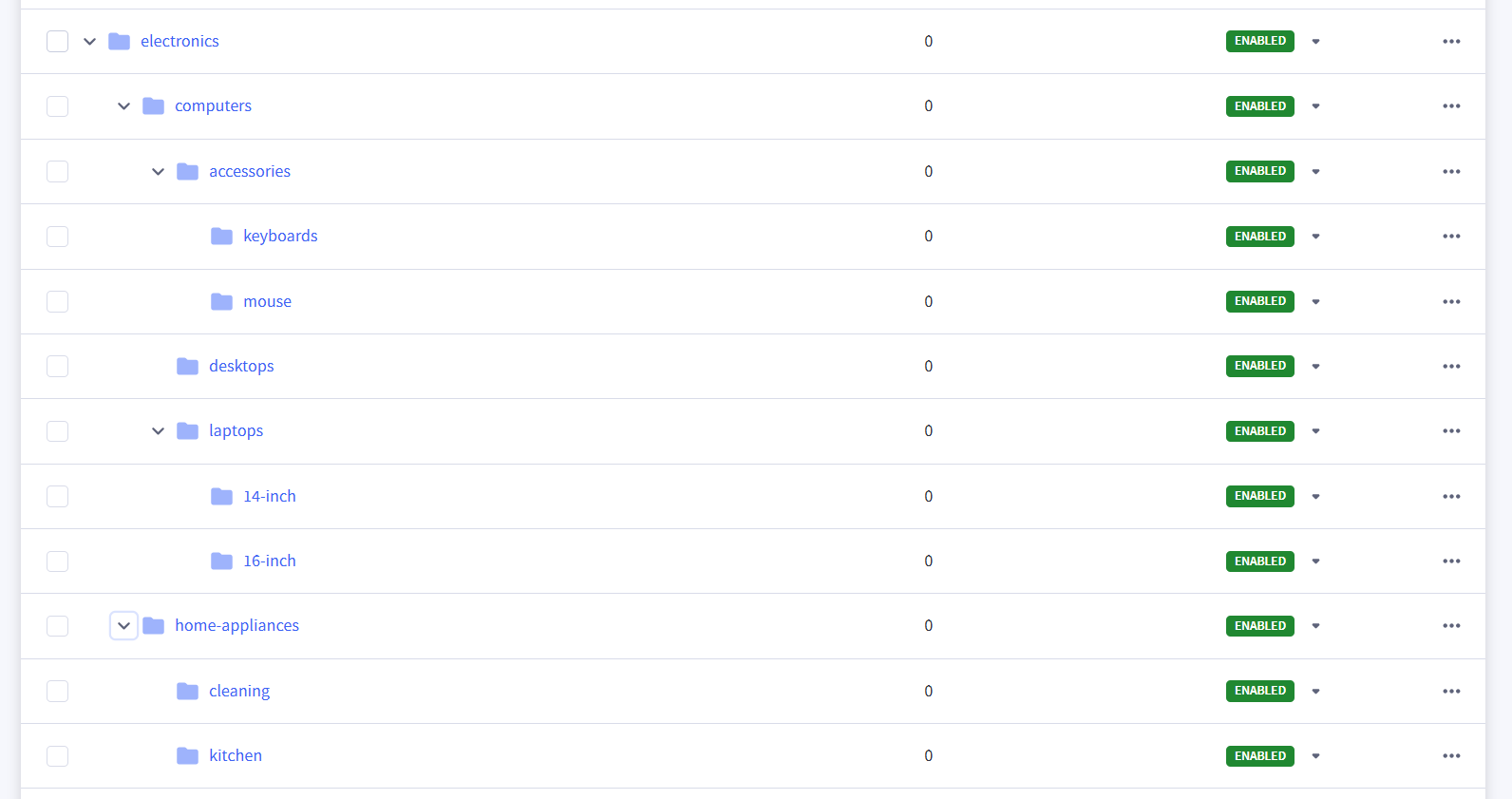
<p><strong>Result in the store</strong></p>
<div class="container_t3cs polaroid_TMZ2"><img src="https://sellertoolsuserdocs.netlify.app/img/Category/category_created-example.png" alt="Guide" class="image_SpsP"><div class="circularOverlay_GBYh" style="top:77%;left:9%"></div></div>
<p><em><strong>Note:</strong></em> only fields that are important for this article are given in the above example table. At present, you need to populate <em>sort_order, url.path and url.is_customized</em> columns also for a successful creation of category branches</p>]]></content>
        <author>
            <name>Subin Paul</name>
            <uri>https://github.com/subinpauljoy</uri>
        </author>
        <category label="bigcommerce" term="bigcommerce"/>
        <category label="category" term="category"/>
        <category label="bulk creation" term="bulk creation"/>
        <category label="csv" term="csv"/>
    </entry>
    <entry>
        <title type="html"><![CDATA[Welcome back]]></title>
        <id>https://sellertoolsuserdocs.netlify.app/blog/welcome-back</id>
        <link href="https://sellertoolsuserdocs.netlify.app/blog/welcome-back"/>
        <updated>2025-04-14T00:00:00.000Z</updated>
        <summary type="html"><![CDATA[Happy Vishu and Easter to everyone!]]></summary>
        <content type="html"><![CDATA[<p>Happy Vishu and Easter to everyone!</p>
<p>We hope you had a wonderful start to the new financial year. We're looking forward to exciting announcements in the coming months.</p>
<h2 class="anchor anchorWithStickyNavbar_LWe7" id="a-year-of-growth-and-transformation">A Year of Growth and Transformation<a href="https://sellertoolsuserdocs.netlify.app/blog/welcome-back#a-year-of-growth-and-transformation" class="hash-link" aria-label="Direct link to A Year of Growth and Transformation" title="Direct link to A Year of Growth and Transformation">​</a></h2>
<p>If you're wondering why we haven't posted lately, it's because 2024 was an incredibly eventful year for us. We were so packed with client projects until recently that we couldn't prioritize the SellerToolsPlus app SaaS launch and go-to-market strategy.</p>
<h3 class="anchor anchorWithStickyNavbar_LWe7" id="bigcommerce-partnership-and-headless-storefronts">BigCommerce Partnership and Headless Storefronts<a href="https://sellertoolsuserdocs.netlify.app/blog/welcome-back#bigcommerce-partnership-and-headless-storefronts" class="hash-link" aria-label="Direct link to BigCommerce Partnership and Headless Storefronts" title="Direct link to BigCommerce Partnership and Headless Storefronts">​</a></h3>
<p>We're thrilled to announce that we are now officially a BigCommerce partner! We recently delivered a large project involving 14 headless storefront channels across the globe for a leading education and publishing client. These channels are distributed across 6 stores, with the same headless storefront using the appropriate BigCommerce store for order checkout based on the customer's country and language.</p>
<h3 class="anchor anchorWithStickyNavbar_LWe7" id="driving-business-growth">Driving Business Growth<a href="https://sellertoolsuserdocs.netlify.app/blog/welcome-back#driving-business-growth" class="hash-link" aria-label="Direct link to Driving Business Growth" title="Direct link to Driving Business Growth">​</a></h3>
<p>In another project, we helped a client grow their business to $1 million USD per day by migrating their store to BigCommerce and optimizing their storefront for conversion.</p>
<h3 class="anchor anchorWithStickyNavbar_LWe7" id="ongoing-projects">Ongoing Projects<a href="https://sellertoolsuserdocs.netlify.app/blog/welcome-back#ongoing-projects" class="hash-link" aria-label="Direct link to Ongoing Projects" title="Direct link to Ongoing Projects">​</a></h3>
<p>We're also currently engaged in several e-commerce store maintenance and new feature development projects, enhancing the storefront experience for our clients.</p>
<h3 class="anchor anchorWithStickyNavbar_LWe7" id="exciting-tools-on-the-horizon">Exciting Tools on the Horizon<a href="https://sellertoolsuserdocs.netlify.app/blog/welcome-back#exciting-tools-on-the-horizon" class="hash-link" aria-label="Direct link to Exciting Tools on the Horizon" title="Direct link to Exciting Tools on the Horizon">​</a></h3>
<p>During these projects, we've developed tools that we believe will be valuable to the BigCommerce merchant community. These tools are coming soon to SellerToolsPlus! We've completed the SaaS layer of the application and are focused on testing and launching it for our customers.</p>]]></content>
        <author>
            <name>Renil Mathews</name>
            <uri>https://www.neopraxis.in/about</uri>
        </author>
        <author>
            <name>Subin Paul</name>
            <uri>https://github.com/subinpauljoy</uri>
        </author>
        <category label="bigcommerce" term="bigcommerce"/>
        <category label="saas" term="saas"/>
        <category label="partnership" term="partnership"/>
        <category label="client projects" term="client projects"/>
    </entry>
    <entry>
        <title type="html"><![CDATA[Bulk Category Creation for BigCommerce]]></title>
        <id>https://sellertoolsuserdocs.netlify.app/blog/bulk-category-creation</id>
        <link href="https://sellertoolsuserdocs.netlify.app/blog/bulk-category-creation"/>
        <updated>2023-08-22T00:00:00.000Z</updated>
        <summary type="html"><![CDATA[The Challenge of Category Management in BigCommerce]]></summary>
        <content type="html"><![CDATA[<h2 class="anchor anchorWithStickyNavbar_LWe7" id="the-challenge-of-category-management-in-bigcommerce">The Challenge of Category Management in BigCommerce<a href="https://sellertoolsuserdocs.netlify.app/blog/bulk-category-creation#the-challenge-of-category-management-in-bigcommerce" class="hash-link" aria-label="Direct link to The Challenge of Category Management in BigCommerce" title="Direct link to The Challenge of Category Management in BigCommerce">​</a></h2>
<p>BigCommerce is a powerful e-commerce platform, but it lacks a native feature for creating categories in bulk. This can be a major pain point for merchants with large catalogs, especially when migrating from other platforms.</p>
<h3 class="anchor anchorWithStickyNavbar_LWe7" id="our-experience-migrating-from-hybris">Our Experience: Migrating from Hybris<a href="https://sellertoolsuserdocs.netlify.app/blog/bulk-category-creation#our-experience-migrating-from-hybris" class="hash-link" aria-label="Direct link to Our Experience: Migrating from Hybris" title="Direct link to Our Experience: Migrating from Hybris">​</a></h3>
<p>We recently encountered this challenge when migrating a store from Hybris to BigCommerce. The store had around 2000 categories, organized in a tree structure with up to 6 levels of parent-child relationships. Manually creating these categories in BigCommerce would have been incredibly time-consuming.</p>
<p>The problem is utmost important to be solved because there are around 7000 SKUs to be imported. While importing products, BigCommerce requires category ID to be specified in the import CSV.</p>
<h3 class="anchor anchorWithStickyNavbar_LWe7" id="our-solution-a-bulk-category-management-tool">Our Solution: A Bulk Category Management Tool<a href="https://sellertoolsuserdocs.netlify.app/blog/bulk-category-creation#our-solution-a-bulk-category-management-tool" class="hash-link" aria-label="Direct link to Our Solution: A Bulk Category Management Tool" title="Direct link to Our Solution: A Bulk Category Management Tool">​</a></h3>
<p>To overcome this limitation, we developed a tool that allows merchants to create, update, delete, and export categories in bulk using a CSV template.</p>
<h3 class="anchor anchorWithStickyNavbar_LWe7" id="the-results-significant-time-savings-no-more-complexity-to-import-category-trees">The Results: Significant Time Savings, no more complexity to import category trees<a href="https://sellertoolsuserdocs.netlify.app/blog/bulk-category-creation#the-results-significant-time-savings-no-more-complexity-to-import-category-trees" class="hash-link" aria-label="Direct link to The Results: Significant Time Savings, no more complexity to import category trees" title="Direct link to The Results: Significant Time Savings, no more complexity to import category trees">​</a></h3>
<p>While preparing the CSV template took some effort, our tool was able to create all 2000 categories in BigCommerce in less than 10 minutes. This saved us countless hours of manual work.</p>
<h3 class="anchor anchorWithStickyNavbar_LWe7" id="key-features-of-our-tool">Key Features of Our Tool<a href="https://sellertoolsuserdocs.netlify.app/blog/bulk-category-creation#key-features-of-our-tool" class="hash-link" aria-label="Direct link to Key Features of Our Tool" title="Direct link to Key Features of Our Tool">​</a></h3>
<ul>
<li><strong>CSV-Based:</strong> Easily manage categories using a simple CSV template.</li>
<li><strong>Bulk Operations:</strong> Create, update, and delete categories in bulk.</li>
<li><strong>Efficient:</strong> Create thousands of categories in minutes.</li>
<li><strong>Smart:</strong> Provided that the input file is prepared in our simple template, it creates many levels of parent child relationship in the category tree like cakewalk. No more tedious multistep category migration.</li>
</ul>
<h3 class="anchor anchorWithStickyNavbar_LWe7" id="whats-next">What's Next?<a href="https://sellertoolsuserdocs.netlify.app/blog/bulk-category-creation#whats-next" class="hash-link" aria-label="Direct link to What's Next?" title="Direct link to What's Next?">​</a></h3>
<p>This tool is currently available to our internal teams and select client merchants. We plan to release it to the public soon, making it easier for all BigCommerce users to manage their categories efficiently. Stay tuned for updates!</p>]]></content>
        <author>
            <name>Subin Paul</name>
            <uri>https://github.com/subinpauljoy</uri>
        </author>
        <category label="bigcommerce" term="bigcommerce"/>
        <category label="category" term="category"/>
        <category label="bulk creation" term="bulk creation"/>
        <category label="csv" term="csv"/>
    </entry>
    <entry>
        <title type="html"><![CDATA[Migrating Order history to BigCommerce]]></title>
        <id>https://sellertoolsuserdocs.netlify.app/blog/migrating-order-history</id>
        <link href="https://sellertoolsuserdocs.netlify.app/blog/migrating-order-history"/>
        <updated>2022-07-29T00:00:00.000Z</updated>
        <summary type="html"><![CDATA[Why Migrating Order History is Crucial for BigCommerce Success]]></summary>
        <content type="html"><![CDATA[<h2 class="anchor anchorWithStickyNavbar_LWe7" id="why-migrating-order-history-is-crucial-for-bigcommerce-success">Why Migrating Order History is Crucial for BigCommerce Success<a href="https://sellertoolsuserdocs.netlify.app/blog/migrating-order-history#why-migrating-order-history-is-crucial-for-bigcommerce-success" class="hash-link" aria-label="Direct link to Why Migrating Order History is Crucial for BigCommerce Success" title="Direct link to Why Migrating Order History is Crucial for BigCommerce Success">​</a></h2>
<p>When migrating your e-commerce store to BigCommerce from a legacy system, it's tempting to focus solely on products and customers. However, neglecting order history can have significant consequences. Here's why migrating your order history is essential for a successful transition:</p>
<h3 class="anchor anchorWithStickyNavbar_LWe7" id="continuity-in-user-experience">Continuity in User Experience<a href="https://sellertoolsuserdocs.netlify.app/blog/migrating-order-history#continuity-in-user-experience" class="hash-link" aria-label="Direct link to Continuity in User Experience" title="Direct link to Continuity in User Experience">​</a></h3>
<p>Customers expect to be able to access their past order information. Migrating order history ensures a seamless transition and maintains customer trust.</p>
<h3 class="anchor anchorWithStickyNavbar_LWe7" id="data-analysis-and-reporting">Data Analysis and Reporting<a href="https://sellertoolsuserdocs.netlify.app/blog/migrating-order-history#data-analysis-and-reporting" class="hash-link" aria-label="Direct link to Data Analysis and Reporting" title="Direct link to Data Analysis and Reporting">​</a></h3>
<p>Order history is a goldmine of data for understanding customer behavior and optimizing your business. By migrating this data, you can:</p>
<ul>
<li><strong>Push purchase data into a data lake:</strong> Integrate your order data with other business intelligence tools for comprehensive analysis.</li>
<li><strong>Create insightful reports:</strong> Analyze purchase patterns, identify top-selling products, and track customer lifetime value.</li>
<li><strong>Optimize conversion rates:</strong> Understand what drives sales and improve your marketing efforts.</li>
</ul>
<h3 class="anchor anchorWithStickyNavbar_LWe7" id="our-solution-seamless-order-history-migration">Our Solution: Seamless Order History Migration<a href="https://sellertoolsuserdocs.netlify.app/blog/migrating-order-history#our-solution-seamless-order-history-migration" class="hash-link" aria-label="Direct link to Our Solution: Seamless Order History Migration" title="Direct link to Our Solution: Seamless Order History Migration">​</a></h3>
<p>We're developing a tool to simplify the process of migrating order history to BigCommerce. Our tool offers:</p>
<ul>
<li><strong>CSV Template Support:</strong> Migrate order data using a simple CSV template.</li>
<li><strong>Automated Data Handling:</strong> Our team handles the creation of associated products and customers, ensuring data integrity.</li>
<li><strong>Backdating Support:</strong> Maintain accurate order dates by backdating orders to their original creation date.</li>
<li><strong>AI-Powered Migration (Coming Soon):</strong> We're exploring the integration of an AI agent to automate the entire migration process from legacy systems. Purely depends on what kind of development is happening in opensource AI.</li>
</ul>
<h3 class="anchor anchorWithStickyNavbar_LWe7" id="whats-next">What's Next?<a href="https://sellertoolsuserdocs.netlify.app/blog/migrating-order-history#whats-next" class="hash-link" aria-label="Direct link to What's Next?" title="Direct link to What's Next?">​</a></h3>
<p>Our order history migration tool is currently available for internal users. We're working hard to release it as a SaaS solution for all BigCommerce users soon! Stay tuned for updates.</p>]]></content>
        <author>
            <name>Renil Mathews</name>
            <uri>https://www.neopraxis.in/about</uri>
        </author>
        <category label="bigcommerce" term="bigcommerce"/>
        <category label="order history" term="order history"/>
        <category label="migration" term="migration"/>
        <category label="data analysis" term="data analysis"/>
    </entry>
    <entry>
        <title type="html"><![CDATA[Migrating blogs to BigCommerce]]></title>
        <id>https://sellertoolsuserdocs.netlify.app/blog/migrating-blogs-to-bigcommerce</id>
        <link href="https://sellertoolsuserdocs.netlify.app/blog/migrating-blogs-to-bigcommerce"/>
        <updated>2021-08-01T00:00:00.000Z</updated>
        <summary type="html"><![CDATA[Solving the BigCommerce Blog Migration Challenge]]></summary>
        <content type="html"><![CDATA[<h2 class="anchor anchorWithStickyNavbar_LWe7" id="solving-the-bigcommerce-blog-migration-challenge">Solving the BigCommerce Blog Migration Challenge<a href="https://sellertoolsuserdocs.netlify.app/blog/migrating-blogs-to-bigcommerce#solving-the-bigcommerce-blog-migration-challenge" class="hash-link" aria-label="Direct link to Solving the BigCommerce Blog Migration Challenge" title="Direct link to Solving the BigCommerce Blog Migration Challenge">​</a></h2>
<p>For many BigCommerce merchants, migrating existing blog content can be a major headache. While BigCommerce offers a native blogging solution, there's no built-in way to import content in bulk.</p>
<h3 class="anchor anchorWithStickyNavbar_LWe7" id="the-two-body-problem-wordpress-for-blogs-and-bigcommerce-for-ecommerce">The two body Problem: WordPress for blogs and BigCommerce for ecommerce<a href="https://sellertoolsuserdocs.netlify.app/blog/migrating-blogs-to-bigcommerce#the-two-body-problem-wordpress-for-blogs-and-bigcommerce-for-ecommerce" class="hash-link" aria-label="Direct link to The two body Problem: WordPress for blogs and BigCommerce for ecommerce" title="Direct link to The two body Problem: WordPress for blogs and BigCommerce for ecommerce">​</a></h3>
<p>One of our clients faced this exact issue. They were running a successful WordPress blog alongside their BigCommerce store. Maintaining two separate platforms was complex and costly, requiring a separate agency to manage the tech stack.</p>
<h3 class="anchor anchorWithStickyNavbar_LWe7" id="our-solution-seamless-blog-migration">Our Solution: Seamless Blog Migration<a href="https://sellertoolsuserdocs.netlify.app/blog/migrating-blogs-to-bigcommerce#our-solution-seamless-blog-migration" class="hash-link" aria-label="Direct link to Our Solution: Seamless Blog Migration" title="Direct link to Our Solution: Seamless Blog Migration">​</a></h3>
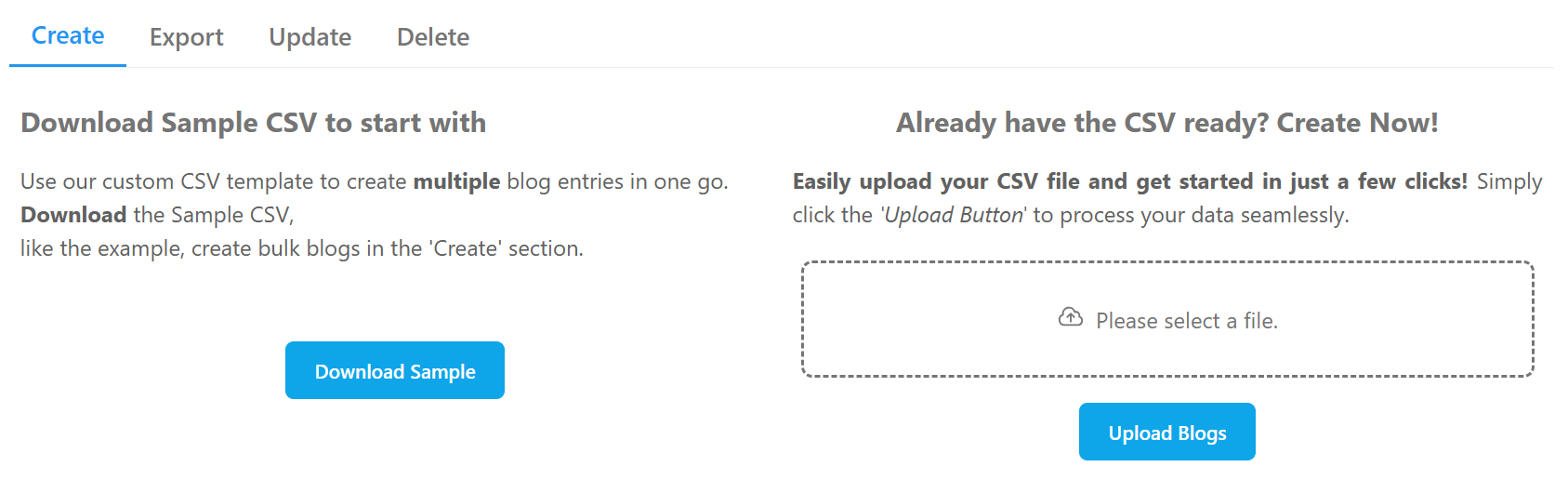
<div class="polaroid_TMZ2"><img src="https://sellertoolsuserdocs.netlify.app/img/account_setup/blogcreate.png" alt="" class="image_SpsP"><p>Screen grab from Blog tool</p></div>
<p>We promised our client a seamless migration of their 500+ WordPress blog posts to the BigCommerce native blog, with no data loss or broken URLs.</p>
<p>To achieve this, we developed a custom tool that supports:</p>
<ul>
<li><strong>Create:</strong> Import new blog posts from a CSV template.</li>
<li><strong>Update:</strong> Modify existing blog posts in bulk.</li>
<li><strong>Delete:</strong> Remove blog posts as needed.</li>
<li><strong>Export:</strong> Export all blog posts to a CSV template.</li>
</ul>
<h3 class="anchor anchorWithStickyNavbar_LWe7" id="the-results-streamlined-content-management">The Results: Streamlined Content Management<a href="https://sellertoolsuserdocs.netlify.app/blog/migrating-blogs-to-bigcommerce#the-results-streamlined-content-management" class="hash-link" aria-label="Direct link to The Results: Streamlined Content Management" title="Direct link to The Results: Streamlined Content Management">​</a></h3>
<p>Thanks to our tool, we successfully migrated over 500 blog posts to BigCommerce without any data loss. The client was able to:</p>
<ul>
<li>Eliminate the expenses and complexity of maintaining a separate WordPress blog.</li>
<li>Consolidate their content management within the BigCommerce platform.</li>
</ul>
<h3 class="anchor anchorWithStickyNavbar_LWe7" id="whats-next">What's Next?<a href="https://sellertoolsuserdocs.netlify.app/blog/migrating-blogs-to-bigcommerce#whats-next" class="hash-link" aria-label="Direct link to What's Next?" title="Direct link to What's Next?">​</a></h3>
<p>This powerful tool is currently exclusive to our client merchants. However, we're excited to announce that it will soon be available to all BigCommerce users as a SaaS solution! Stay tuned for updates.</p>]]></content>
        <author>
            <name>Subin Paul</name>
            <uri>https://github.com/subinpauljoy</uri>
        </author>
        <category label="bigcommerce" term="bigcommerce"/>
        <category label="blogs" term="blogs"/>
        <category label="migration" term="migration"/>
        <category label="csv" term="csv"/>
    </entry>
    <entry>
        <title type="html"><![CDATA[New start! tools for BigCommerce Merchants]]></title>
        <id>https://sellertoolsuserdocs.netlify.app/blog/tools-for-bigcommerce</id>
        <link href="https://sellertoolsuserdocs.netlify.app/blog/tools-for-bigcommerce"/>
        <updated>2021-07-28T00:00:00.000Z</updated>
        <summary type="html"><![CDATA[Embarking on a Journey to Empower BigCommerce Merchants]]></summary>
        <content type="html"><![CDATA[<h2 class="anchor anchorWithStickyNavbar_LWe7" id="embarking-on-a-journey-to-empower-bigcommerce-merchants">Embarking on a Journey to Empower BigCommerce Merchants<a href="https://sellertoolsuserdocs.netlify.app/blog/tools-for-bigcommerce#embarking-on-a-journey-to-empower-bigcommerce-merchants" class="hash-link" aria-label="Direct link to Embarking on a Journey to Empower BigCommerce Merchants" title="Direct link to Embarking on a Journey to Empower BigCommerce Merchants">​</a></h2>
<p>We're excited to announce the start of our project: building API-based tools to help BigCommerce store owners thrive. (We're yet to name our app. Will announce it here in a later post)</p>
<h3 class="anchor anchorWithStickyNavbar_LWe7" id="the-vision">The Vision<a href="https://sellertoolsuserdocs.netlify.app/blog/tools-for-bigcommerce#the-vision" class="hash-link" aria-label="Direct link to The Vision" title="Direct link to The Vision">​</a></h3>
<p>Our goal is simple: to create practical, cloud-based solutions for common challenges faced by BigCommerce merchants. We believe that by leveraging the power of APIs, we can unlock new levels of efficiency and control.</p>
<h3 class="anchor anchorWithStickyNavbar_LWe7" id="what-to-expect">What to Expect<a href="https://sellertoolsuserdocs.netlify.app/blog/tools-for-bigcommerce#what-to-expect" class="hash-link" aria-label="Direct link to What to Expect" title="Direct link to What to Expect">​</a></h3>
<p>Over the coming weeks and months, we'll be sharing our progress, insights, and tools with you. Expect to see:</p>
<ul>
<li>In-depth articles about BigCommerce API based integration development</li>
<li>Tutorials on using our tools to solve real-world problems</li>
<li>Updates on new features and improvements</li>
</ul>
<p>Stay tuned for more!</p>]]></content>
        <author>
            <name>Subin Paul</name>
            <uri>https://github.com/subinpauljoy</uri>
        </author>
        <category label="Hola" term="Hola"/>
        <category label="Docusaurus" term="Docusaurus"/>
        <category label="bigcommerce" term="bigcommerce"/>
        <category label="api" term="api"/>
        <category label="tools" term="tools"/>
    </entry>
</feed>