Organization Information
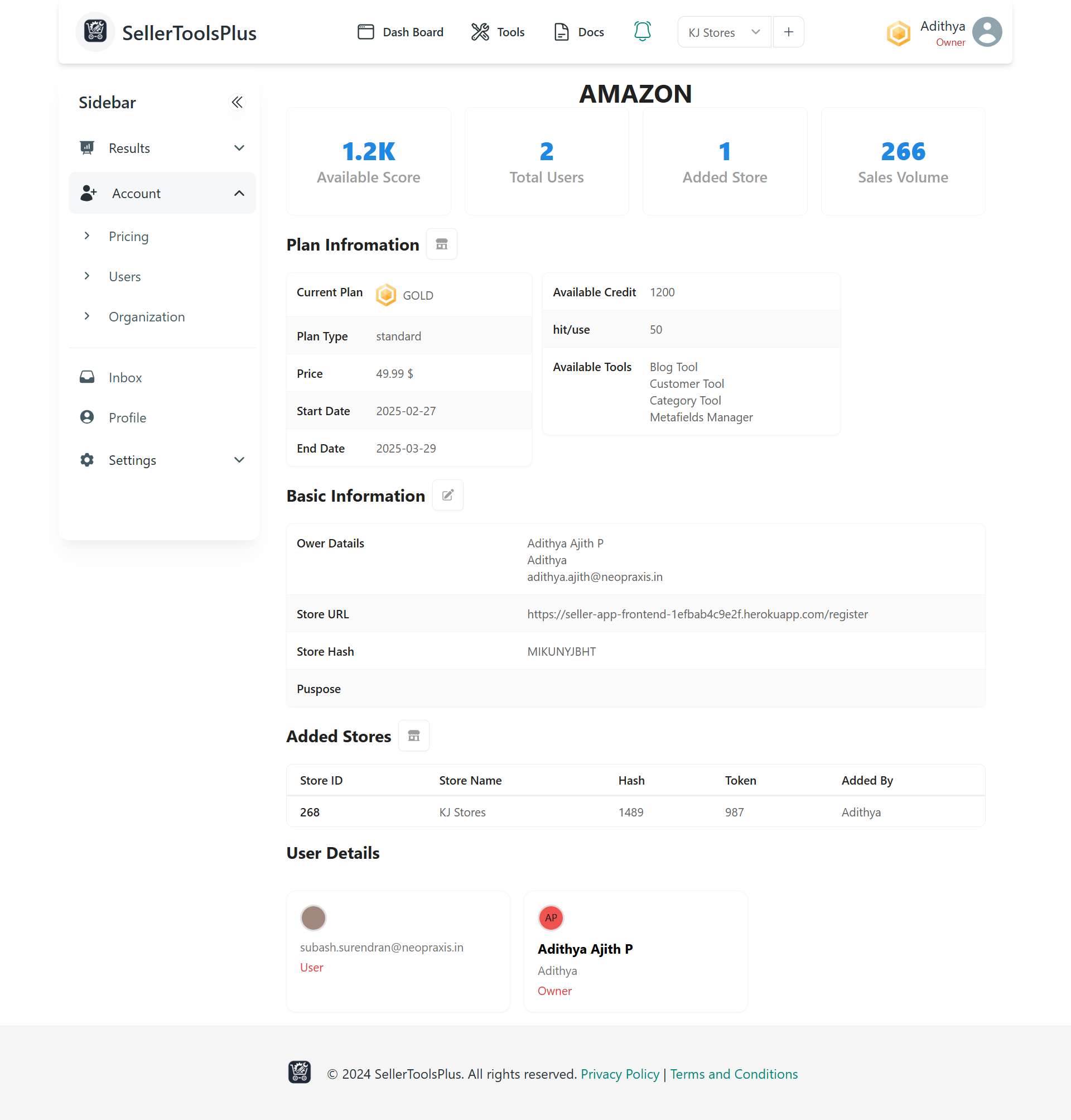
When you click on the Account section in the sidebar, there is an option called Organization. Clicking on Organization displays the following information horizontally:
- Available Score
- Total Number of Users
- Number of Stores Added
- Sales Volume
Plan Information
The Plan Information section provides details about your current subscription. You can navigate back to the plan using the icon next to the Plan Information heading. You can also change your plan from this section.
Plan Details
In the Plan Information section, you can see the following details:
- Current Plan
- Plan Type
- Plan Price
- Start and End Date of the Current Plan
- Available Credit
- Number of Hits/Uses
- Available Tools
Basic Information
The Basic Information section allows you to update your organization's basic details by clicking the Edit icon next to the Basic Information heading.
Creating a New Organization
To create a new organization, fill out the form carefully before submitting it. You can update the organization's information, including:
- Organization Name
- Purpose of Creating the Organization
- Store URL
- Store Hash
- Sales Volume
Added Stores
After adding an organization, you can see the Added Stores, which include details such as:
- Store ID
- Store Name
- Store Hash
- Store Token
- Name of the Person Who Added the Store
You can also add more stores using the icon next to the Added Stores heading.