Plan and pricing
- You automatically are in the free trial plan when the first time when you sign-up into the app.
- The free plan enables everyone to explore our tools with limited usage.
- If you wish to continue using them with a higher usage limit, the Account Owner can upgrade the plan to one of our paid tiers or opt for a custom plan tailored to your business needs.
- Go to the apps Pricing page to view the plans.
Subscription Management
- If a subscription exists and is canceled, it prompts the user to confirm if they want to create a new subscription.
- If no active subscription exists, a new subscription is created.
- If a subscription exists, it is updated to the selected tier.
Accessing the Pricing Section
-
Navigate to the Dashboard.
-
Locate the Sidebar on the left-hand side.
-
Click on Accounts.
-
Select Pricing to view the available plans.
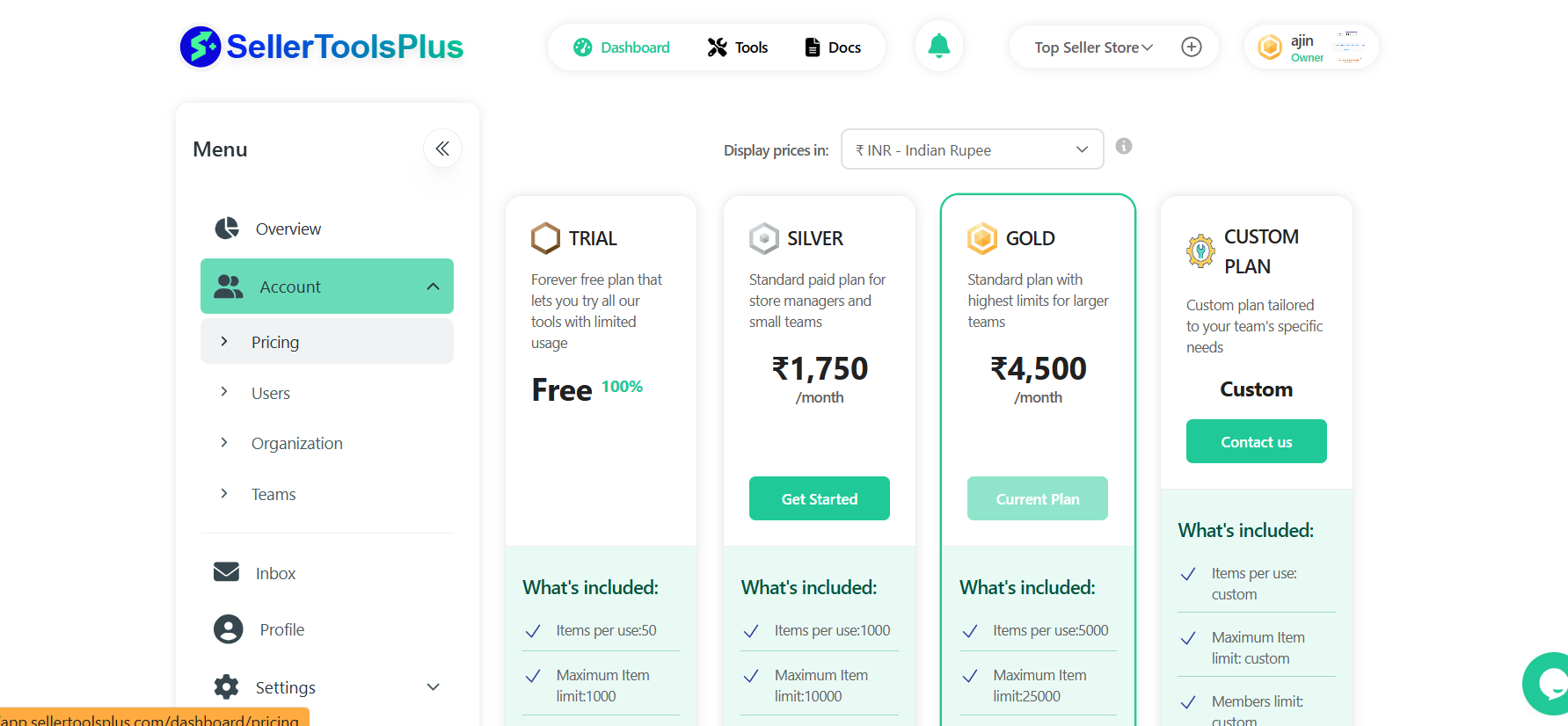
1. Trial plan
The Trial Plan is designed for first-time users who want to explore SellerToolsPlus without any financial commitment.
Cost:
- Free
Features:
-
Provides basic functionality to familiarize users with the platform.
-
No credit card is required for activation.
-
Ideal for new users looking to evaluate the platform before upgrading.
-
Activation: Automatically assigned when a user registers on the platform.
2. Silver plan
The Silver Plan is a budget-friendly option that unlocks additional features beyond the Trial Plan.
Cost:
- $19.98 per month(actuals may vary as per price revision and currency conversion rates)
Features:
-
Access to more advanced tools and functionalities.
-
Suitable for small businesses looking for enhanced capabilities.
How to Subscribe:
-
Click the "Get Started" button.
-
A confirmation message appears: "Do you want to try the Silver Plan?"
-
Click Confirm to activate the plan.
3. Gold plan
The Gold Plan is designed for users who require premium features and extended functionality.
Cost:
- $49.99 per month(actuals may vary as per price revision and currency conversion rates)
Features:
-
Includes all features of the Silver Plan.
-
Provides additional advanced tools to optimize operations.
-
Suitable for medium to large businesses requiring comprehensive solutions.
How to Subscribe:
-
Click the "Get Started" button.
-
A confirmation message appears: "You are currently subscribed to the GOLD plan. Do you want to switch to the SILVER plan?"
-
If switching, an additional warning appears: "If you switch to the Gold plan, your next invoice will be generated based on the selected plan's pricing. This may result in additional charges."
-
Click Confirm to proceed with the Gold Plan.
4. Custom plan
The Custom Plan allows businesses to tailor their subscription based on specific needs and requirements.
Cost:?
- Pricing varies based on customization.
Features:
-
Users can select and customize features to suit their business operations.
-
Ideal for enterprises with unique workflow requirements.
-
Provides personalized support and consultation.
How to Subscribe:
-
Click the "Contact Us" button.
-
A new page will open to enter your details.
-
Fill out the form with:
-
Name
-
Work Email
-
Phone Number
-
Job Title
-
Company Size (number of employees)
-
Additional Comments (optional)
-
-
Click "Contact Sales" to submit the request.
-
This will open a support ticket in our system, you will start receiving email communication whenever there is an update in the ticket. A sales representative will get in touch with you to discuss customized plan options through the support ticket.